

2022 Updated Verified Pass 3V0-643 Study Guides & Best Courses
Ultimate Guide to the 3V0-643 - Latest Edition Available Now
NEW QUESTION 11
In the Dev environment, you have the application and database servers on separate networks created previously. Configure inbound only network security to allow only Dev application servers access to Dev database servers using MYSQL service port.
Requirements:
vCenter: vcsa-01a.corp.local
Credentials: [email protected] / VMware1!
Service Port: MYSQL
Networks: Dev-App-Tier-01-NEW and Dev-DB-Tier-01-NEW
Credentials for Dev VMs: root / VMware1!
This rule should be in its own "DB security-NEW" section.
Ensure inbound only network security allows Dev application servers access to Dev database servers.
This rule should not be prpogated to all NSX prepared clusters.
This rule should be created in a way that any new virtual machines on App and DB segments will be secured.
This rule should be created with the fewest rule(s) possible.
All other servers should be denied.
Ensure inbound security requirements are met.
HOL LAB for Practice:
See the explanation part for complete solution.
Answer:
Explanation:
SOLUTION:
Firewall -> add new Section:


Add new Rule under newly created Section:
Edit Rule Name:

Source = Dev-App-Tier-01-NEW (LS)
Destination = Dev-DB-Tier-01-NEW (LS)
Service = MySQL
Allow - In
Applied To: Logical Switch = Dev-DB-Tier-01-NEW
Add another rule = To Deny

Set destination: Logical Switch = Dev-DB-Tier-01-NEW

Bring to last the Deny rule:

NEW QUESTION 12
Management requires you to build a new logical topology for a new application that will include a hardware search appliance (HAS). The new application must contain a web tier and database tier on separate IP domains. Use the existing App01-DLR to complete the task.
Requirements:
vCenter: vcsa-01.corp.local
Credentials: [email protected] / VMware1!
vDS: vds-mgt-edge-a
Existing DLR Name: App01-DLR
New object prefix - App01
New object suffic - New
Create a new distributed port group for this task named vds-HSA-NEW.
The HAS must reside on the same IP subnet as the database.
The new application must contain a web tier and database tier on separate domains to be used at a future date.
Once deployed the HAS will be connected to a network with VLAN ID 500.
The proper physical switch ports for the uplinks have already been trunked to include VLAN 500.
VLANs configured in the compute racks are isolated to a single rack.
Any objects/items created must be named with a prefix of App01 and a suffix containing their function with NEW (for example: App01-Function-NEW) NOTE:
The hardware appliance and application virtual machines have not been deployed. Attempts to connectivity to the appliance will not succeed.
HOL LAB for Practice:
Bridging and other questions 7, 8, 9 and LAB - HOL-1925-02 Module 1
See the explanation part for complete solution.
Answer:
Explanation:
SOLUTION:
Step 1: From SiteA vCenter web client -> Networking -> Data Center SiteA -> create a new distribution port group named vds-HAS-NEW with VLAN ID 500 in vds-mgmt-edge.


Create LS on 192.168.110.15 = App01-WebTier-NEW
Create LS on 192.168.110.15 = App01-DBTier-NEW
NSX Edges -> App01-DLR
8) got NsX Edge and select App01-DLR. select Manage, select settings and click on + Sign (9) Enter interface name App01-Web-New, select type internal. select App01-Webtier-New LS Enter ip address 192.168.1.1/24. repeat the same steps for App01-DBtier-New but take ip addres
192.168.2.1 /24
Name: App01-Bridge-NEW
Logical Switch: App01-DBTier-NEW
Distributed Port Group: vds-HAS-NEW

(11) be sure under App01-DB-New the bridging is enable.
NEW QUESTION 13
You have been tasked with enabling syslog on the NSX Manager (nsmgr-01a.corp.local) and all NSX Controllers.
Requirements:
vCenter: vcsa-01a.crop.local
NSX Manager A: nsxmgr-01a.corp.local
Password: VMware1!
Syslog Information:
Server: 192.168.110.24
Port: 514
Protocol: UDP
Header Information:
Authentication: Basic
Content-Type: application/xml
Enable syslog for NSX Manager.
Enable syslog for NSX controllers.
HOL LAB for Practice:
See the explanation part for complete solution.
Answer:
Explanation:
SOLUTION:

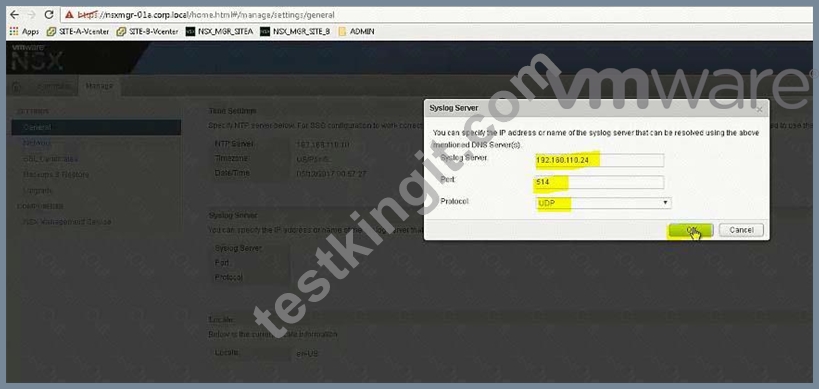

Open API guide from desktop, scroll down for Controller Syslog URI.
In exam search function doesn't work so you should be familiar with the document.
In exam, user hostname instead of IP address (IP address wont work).
For version (2.0), also check API guide version, it could be 2.1 or 2.0 GET
https:// nsxmgr-01a.corp.local/api/2.0/vdn/controller/controller-1/syslog

Copy the required parameters from API guide or memorize.


Verify
Do the same for controller-2
Do the same for controller-3
NEW QUESTION 14
Provide automatic IP assignment for the servers on the DEV-DB-Tier-01-NEW segment.
Requirements:
vCenter: vcsa-01a.corp.local
Credentials: [email protected] / VMware1!
Edge: Dev-Edge
Automatically allocate IP addreesses in the 172.16.30.100-149 range.
Lease time: 1 hour
Ensure hosts that receive an IP assignment will be able to reach the other Dev subnets.
The legacyhost-NEW with the MAC address 40:00:00:00:00:01 must always be assigned 172.16.30.99 Ensure other parameters match those of the dynamic allocation mechanism (Task1).
Enable logging with the highest level of detail for automatic IP allocations.
Ensure all requirements have been met.
NOTE:
Do not configure DHCP Relay agent on the Dev-DLR-NEW as this will be done by another administrator.
HOL LAB for Practice:
DHCP and other questions 7, 8, 9
See the explanation part for complete solution.
Answer:
Explanation:
SOLUTION:

Add Pool as per given details:

Add Pool as per given details:


NEW QUESTION 15
The security team has requested that [email protected] have the ability to fully manage NSX Manager (192.168.210.15) for Site B.
Requirements:
vCenter: vcsa-01b.corp.local
Credentials: [email protected] / VMware1!
Ensure [email protected] has the ability to fully manage NSX Manager in SiteB.
NOTE:
You may have to log out of the web client and back in for 192.168.210.15 to show in web client.
HOL LAB for Practice:
See the explanation part for complete solution.
Answer:
Explanation:
SOLUTION:
NSX Manager in SiteB
[email protected]

go to Nsx manager - b. select Manage Vcenter registration. check if lookup service is configured if not configured it will the details.
lookup service ip = Nsx Manager - a IP Address
Lookup service port = 7444
Lookup service= https://192.168.110.15:7444/lookupservice/sdk
SSO administrator = [email protected]
password = VMware1!
click on ok. click on yes.
NOTE: it will show u connected. if not connected. logout and login again
NEW QUESTION 16
Configure a solution that extends an IP subnet between two data centers. The solution must ensure secure communication between two data centers. A standalone Edge Appliance has already been deployed and preconfigured in Site-B on the Compute Cluster.
Requirements:
vCenter: vcsa-01a.corp.local
Credentials: [email protected] / VMware1!
HQ Site Information:
Edge: Preimeter-Gateway-01
Logical Segment: Extend-LS-01
Connected to: vds-mgt-a_Trunk_Network
VPN Server settings: 192.168.100.3
Use the system generated certificate.
Preconfigured Standalone Edge Appliance: NSX l2vpn
Edge: 192.168.200.5
L2VPN Server Information:
Name: Peer-Site-NEW
Trunk ID = 10
User ID = peeruser1
Password = VMware1!
Encryption = AES256-SHA
The solution must ensure secure communication between the data centers.
NOTE:
No virtual machines are attached to the Logical switch Application-Tier-01, so there is no need to test communication across the tunnel.
Ensure that L2VPN server statistics shows Tunnel status of UP.
HOL LAB for Practice:
L2VPN and other questions 7, 8, 9
See the explanation part for complete solution.
Answer:
Explanation:
SOLUTION:
Add new Logical Switch: "Application-Tier-01"
NSX Edges -> Perimeter-Gateway-01 -> Manage -> Settings -> Interfaces -> edit vNIC4
Name: Extend-LS-01
Type: Trunk
Connected To:
Distributed Portgroup: vds-mgmt-a_trunknetwork
Add Sub Interface:


L2VPN Settings:
( select VPN under manage and enable L2VPN. click publish changes..
Then below
In actual exam, encryption is = AES256-SHA


(8) go to Vcenter b select datacenter - b. select Nsxl2vpn Edge under datacenter B click on Action select Power and click on Power on.
(9) check after few minutes the VPN Status by clicking Show L2VPN Statistic.
be sure its up. select PGW01 select VPN under Manage select L2VPN enable and click on publish changes.
NEW QUESTION 17
You have been tasked with creating a new Layer 2 network toplogy for test and development systems which mirrors the existing production environment.
Requirements:
vCenter: vcsa-01a.corp.local
Credentials: [email protected] / VMware1!
Transport Zone: Local-Transport-Zone-A
New Dev Segments:
Dev-Web-Tier-01-NEW
Dev-App-Tier-01-NEW
Dev-DB-Tier-01-NEW
Create Layer 2 network topology for the test and development systems.
NOTE:
The routing components will be addressed in subsequent scenarios.
HOL LAB for Practice:
See the explanation part for complete solution.
Answer:
Explanation:
SOLUTION:
Create 3 Logical Switches on NSX Manager A (192.168.110.15)
HOL 1903-01 Page 37-38
Dev-Web-Tier-01-NEW
Dev-App-Tier-01-NEW
Dev-DB-Tier-01-NEW
(3) Dont Forget to create a Dev-Transit Switch if its not there.
NEW QUESTION 18
In the previous scenario, vCenter vcsa-b.corp.local was configured for NSX. Now the hosts must be prepared for NSX and the initial VXLAN configuration should be completed.
Requirements:
vCenter: vcsa-01b.corp.local
Credentials: [email protected] / VMware1!
Cluster: Compute Cluster 1B
ESXi Hosts: esx-01b.corp.local, esx-02b.corp.local
VTEP Information:
VMKNic Teaming Policy: Fail Over
VLAN: 0
MTU: 1600
IP Pools for VTEP:
* Name: Compute_1B_VTEP_Pool-New
* Gateway: 192.168.230.1
* Prefix Length: 24
* Static IP Pool: 192.168.230.51 - 192.168.230.60
* Segment ID Pool: 6001-7000 - HOL 1903-01 Page 26-36
* VXLAN Span: Compute Cluster 1B - HOL 1903-01 Page 26-36
* Transport Zone: Local-Transport-Zone-B-New - HOL 1903-01 Page 26-36
* Host must be prepared for NSX
* Use provided information to complete the initial VXLAN configuration.
* The underlying physical network does not support multicast.
* Ensure that requirements are met:
* Create the IP Pool as given:
* Do the Host preparation.
* Create a Local Transport Zone as given. - HOL 1903-01 Page 26-36
* Create the segment ID as given. - HOL 1903-01 Page 26-36
HOL LAB for Practice:
http://docs.hol.vmware.com/hol-isim/HOL-2019/hol-1903-01-nsxinstall-p2.htm and LAB - HOL 1903-01 Page 26-36 See the explanation part for complete solution.
Answer:
Explanation:
SOLUTION:
HOL 1903-01 Page 26-36
Login to vCenter b Web Client and from Networking and Security -> Installation -> select to SiteB NSX Manager -> Host Preparation and prepare the hosts as below:


Add Static Pool as per give details in the QUESTION


NEW QUESTION 19
Configure the Layer 3 connectivity between the newly created Dev-segments by assigning them to a new DLR named Dev-DLR-NEW.
Requirements:
vCenter: vcsa-01a.corp.local
Ccredentials: [email protected] . VMware1!
Default GW for Dev-subnets:
Dev-Web-Tier-01-NEW172.16.10.1/24
Dev-App-Tier-01-NEW172.16.20.1/24
Dev-DB-Tier-01-NEW172.16.30.1/24
DLR Settings:
DLR Name: Dev-DLR-NEW
Uplink IP Address: 192.168.6.5/30
Interface: Dev-Transit
Password: VMware1!WMware1!
Cluster: Management & Edge Cluster
Ensure east-west routing has been optimized.
The control plane failover should begin 15 seconds on logical switch HA-VXLAN.
Ensure secure shell is available.
Connect the Web, App and DB virtual machines to their respective dev tiers.
Dev-web-01, Dev-web-02a, Dev-web-04a
Dev-app-01a
Dev-db-01a
HOL LAB for Practice:
also deploy Distributed logical router DLR in the same way the lab.
See the explanation part for complete solution.
Answer:
Explanation:
SOLUTION:
Add VMs to respective Logical Switches:


No need for below
To change the control plane failover within 15 seconds use the RESTClient as shown below or the Postman application in Chrome.
Open Firefox
Open RESTClient from Firefox
Authentication
Basic Authenticaion
Admin
VMware1!
Headers
Custom Headers
Content-Type
Application/xml

Note down the edge id of newly created DLR (in exam its edge-12)
There will be a NSX API guide on desktop and look for "declaredeadtime".
Or memorize below string:
URL: https://192.168.110.15/api/4.0/edges/edge-10/highavailability/config Note: in exam its edge-12 but make sure!

Change the value to 15
Body:
<highAvailability>
<declareDeadTime>15</declareDeadTime>
</highAvailability>

NEW QUESTION 20
......
Objective 3.3 â Configure and Manage Additional VMware NSX Edge Services:
- Configure DHCP relay
- Configure DHCP services according to a deployment plan:
- Create/edit a DHCP IP Pool
- Create/edit DHCP Static Binding
4. Secure a vSphere Data Center with VMware NSX
Objectives covered by this section:
Dumps MoneyBack Guarantee - 3V0-643 Dumps Approved Dumps: https://www.testkingit.com/VMware/latest-3V0-643-exam-dumps.html