

2026 Correct Practice Tests of Web-Development-Applications Dumps with Practice Exam
Certification Sample Questions of Web-Development-Applications Dumps With 100% Exam Passing Guarantee
WGU Web-Development-Applications Exam Syllabus Topics:
| Topic | Details |
|---|---|
| Topic 1 |
|
| Topic 2 |
|
| Topic 3 |
|
| Topic 4 |
|
NEW QUESTION # 76
What does a computer use to read and execute JavaScript code?
- A. A validator
- B. A compiler
- C. A virtual machine
- D. An interpreter
Answer: D
Explanation:
> "JavaScript is an interpreted programming language. The JavaScript engine within the browser (e.g., V8 for Chrome) parses and executes the JavaScript code line by line."
>
> "Though modern engines use Just-In-Time (JIT) compilation internally, JavaScript remains primarily interpreted from the developer's perspective." References:
* MDN Web Docs: JavaScript Engine
* ECMAScript Language Specification
---
NEW QUESTION # 77
Which event occurs when a user closes a browser?
- A. abort
- B. unload
- C. reset
- D. submit
Answer: B
Explanation:
> "The `unload` event is fired when the document or a child resource is being unloaded. This includes closing the browser window or navigating away from the page."
>
> "Events like `submit`, `abort`, and `reset` are related to form actions, not page unloads." References:
* MDN Web Docs: Window unload event
* HTML Living Standard: GlobalEventHandlers
---
NEW QUESTION # 78
What should a developer correct before revalidating after a code validator reports multiple errors in code?
- A. The last reported error
- B. Only JavaScript errors
- C. The first reported error
- D. Only CSS errors
Answer: C
Explanation:
When using a code validator to check your HTML, CSS, or JavaScript code, it's essential to address errors in a systematic manner. The correct approach is to correct the first reported error before revalidating. This method is recommended because often, the first error can cause a cascade of subsequent errors or warnings.
By fixing the first error, you may automatically resolve other errors that were reported later.
* Reasoning:
* Cascading Errors: The first error in the code might lead to multiple subsequent errors. Fixing it can sometimes resolve those cascading errors, reducing the overall number of errors in the next validation.
* Logical Flow: Addressing errors in the order they appear maintains a logical flow and makes debugging more manageable.
* Steps to Follow:
* Step 1: Run the code through the validator.
* Step 2: Identify the first reported error.
* Step 3: Correct the first error.
* Step 4: Revalidate the code to check if the error count has reduced or if new errors appear.
* Step 5: Repeat the process until all errors are resolved.
:
W3C Markup Validation Service
MDN Web Docs - Debugging HTML
W3C CSS Validation Service
NEW QUESTION # 79
Which option changes the content of the first line to a valid CSS comment?
- A. <!-- this is a comment -->
- B. <! "this is a comment">
- C. // this is a comment
- D. /* this is a comment */
Answer: D
Explanation:
In CSS, comments must begin with /* and end with */.
"CSS comments are placed inside /* and */. These comments can span multiple lines and are ignored by the browser." HTML-style comments using <!-- --> and JavaScript-style comments using // are not valid in CSS and may cause parsing errors.
References:
CSS Syntax Specification
MDN Web Docs - CSS Comments
W3Schools - CSS Comment Rules
9
Given the following CSS code:
.title {
colqr : white;
}
Which HTML element is affected?
Q <div id="title"X/div>
Q <titlex/title>
Q <div>title</div>
0 <div class="title"x/div>
NEW QUESTION # 80
Given the following javaScript code: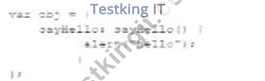
Which code segment calls the method?
- A. Window,sayhello();
- B. Obj,sayHello;
Answer: B
Explanation:
To call the sayHello method in the given JavaScript object, you need to use the object's name followed by the method name with parentheses.
* Correct Method Call:
* Given the object definition:
var obj = {
sayHello: function() {
alert("Hello");
}
};
* To call the method sayHello on the object obj:
obj.sayHello();
* Explanation:
* Option A: Obj.sayHello; is incorrect syntax. The correct syntax is obj.sayHello();.
* Option B: Window.sayHello(); is incorrect because the method is defined in the obj object, not the window object.
* References:
* MDN Web Docs - Functions
* W3Schools - JavaScript Objects
NEW QUESTION # 81
Which HTML tag should a developer use to create a drop-down list?
- A. <Output>
- B. <Section >
- C. <Option>
- D. <Select>
Answer: D
Explanation:
The <select> tag is used in HTML to create a drop-down list. It is used in conjunction with the <option> tags to define the list items within the drop-down menu.
* Purpose of <select>: The <select> element is used to create a control that provides a menu of options.
The user can select one or more options from the list.
* Structure of Drop-down List:
* The <select> element encloses the <option> elements.
* Each <option> element represents an individual item in the drop-down list.
* Usage Example:
<label for="cars">Choose a car:</label>
<select id="cars" name="cars">
<option value="volvo">Volvo</option>
<option value="saab">Saab</option>
<option value="fiat">Fiat</option>
<option value="audi">Audi</option>
</select>
In this example, the <select> tag creates a drop-down list with four options: Volvo, Saab, Fiat, and Audi.
* Attributes of <select>:
* name: Specifies the name of the control, which is submitted with the form data.
* id: Used to associate the <select> element with a label using the <label> tag's for attribute.
* multiple: Allows multiple selections if set.
References:
* MDN Web Docs on <select>
* W3C HTML Specification on Forms
NEW QUESTION # 82
Which layout method causes images to render to small or too large in browser windows of different sizes?
- A. Fluid
- B. Relative width
- C. Fixed width
- D. Liquid
Answer: C
Explanation:
A fixed-width layout method specifies exact pixel values for widths. This approach does not adapt to different screen sizes, leading to images rendering too small or too large on various devices.
* Fixed Width Layout:
* Definition: Uses specific pixel values for the width of elements.
* Example:
container {
width: 800px;
}
* Issues:
* Lack of Flexibility: Does not scale with the size of the viewport, causing images and other elements to appear incorrectly sized on different screen sizes.
* Comparison:
* Fluid/Liquid: Adapts to the screen size using percentages or other relative units.
* Relative Width: Also adapts using units like em or %.
* References:
* MDN Web Docs - Fixed vs. Fluid Layout
* W3C CSS Flexible Box Layout Module Level 1
Using fixed-width layouts can result in poor user experience across different devices, highlighting the importance of responsive design principles.
Top of Form
Bottom of Form
NEW QUESTION # 83
Given the following code:
What is occurring?
- A. An event handler is tracking keyboard strokes.
- B. JavaScript is using the DOM to make a style change.
- C. In-line CSS is styling the <h1> tag.
Answer: B
Explanation:
The given code snippet demonstrates how JavaScript can manipulate the DOM to change the style of an element.
* Code Analysis:
* Given the HTML:
<h1 id="id1">Blog Title</h1>
<button type="button" onclick="document.getElementById('id1').style.color = 'red'">Click Here</button>
* When the button is clicked, the JavaScript code within theonclickattribute changes the color of theh1element to red.
* Explanation:
* Option A: An event handler tracking keyboard strokes is incorrect because the event handler is tracking a mouse click, not keyboard strokes.
* Option B: JavaScript is using the DOM to make a style change is correct because theonclickattribute contains JavaScript code that modifies the style of theh1element.
* Option C: In-line CSS is styling the<h1>tag is incorrect because the style change is done via JavaScript, not inline CSS.
:
MDN Web Docs - Document.getElementById()
W3Schools - JavaScript HTML DOM
NEW QUESTION # 84
Which code segment creates a slider field that accepts a numeric value ranging from 1 through 10?
- A.

- B.

- C.

- D.

Answer: C
Explanation:
To create a slider field that accepts a numeric value ranging from 1 through 10, theinputelement withtype=" range"should be used. Theminandmaxattributes define the range of acceptable values.
* HTML Input Typerange:
* Purpose: Therangetype is used for input fields that should contain a value from a specified range.
* Attributes:
* type="range": Specifies that the input field should be a slider.
* min="1": Sets the minimum acceptable value.
* max="10": Sets the maximum acceptable value.
* Example:
* Given the HTML:
<input type="range" name="sat-level" min="1" max="10">
* Options Analysis:
* Option A:
<input type="number" name="sat-level" max="10">
* This creates a numeric input field, not a slider.
* Option B:
<input type="range" name="sat-level" min="1" max="10">
* This is the correct option that creates a slider field with the specified range.
* Option C:
<input type="number" name="sat-level" min="1" max="10">
* This creates a numeric input field, not a slider.
* Option D:
<input type="range" name="sat-level" max="10">
* This creates a slider but lacks theminattribute, so it doesn't fully meet the requirement.
:
MDN Web Docs -<input type="range">
W3Schools - HTML Input Range
By using the correct attributes, the slider field will allow users to select a value between 1 and 10.
NEW QUESTION # 85
What is a common technique to ensure users can access all content on a mobile web page?
- A. Access to multiple link layers
- B. Targeted site content
- C. Navigation links requiring scrolling
- D. A link to the full site
Answer: D
Explanation:
Providing a link to the full site on a mobile web page is a common technique to ensure users can access all content if they find the mobile version limiting.
* Advantages:
* Access to Full Functionality: Users can switch to the desktop version if they need features not available on the mobile site.
* User Control: It gives users the choice to view the site in a layout they are more comfortable with.
* Other Options:
* A. Access to multiple link layers: This does not directly address user needs for full site access.
* B. Targeted site content: While important, it does not replace the need for a full site link.
* D. Navigation links requiring scrolling: This can worsen the user experience on mobile devices.
* References:
* Google Developers - Mobile Site Design
NEW QUESTION # 86
A web page has a section that contains an `<article>` element. The element is always 10 pixels to the right of its normal position.
Which type of layout positioning should the `<article>` element use?
- A. Fixed
- B. Absolute
- C. Static
- D. Relative
Answer: D
Explanation:
> "Relative positioning allows an element to be positioned relative to its normal (static) position. For example, `left: 10px` shifts the element 10 pixels to the right of its original location."
>
> "Unlike `absolute` or `fixed`, relative positioning does not remove the element from the document flow." References:
* MDN Web Docs: position: relative
* CSS Positioning Module Level 3
---
NEW QUESTION # 87
Which element attaches an external CSS document to a web page?
- A. <Script>
- B. <style>
- C. <Meta>
- D. <Link>
Answer: D
Explanation:
To attach an external CSS document to a web page, the <link> element is used within the <head> section of the HTML document.
* <link> Element:
* Purpose: Links external resources, such as stylesheets, to the HTML document.
* Attributes:
* rel="stylesheet": Specifies the relationship between the current document and the linked resource.
* href="path/to/stylesheet.css": Specifies the URL of the external stylesheet.
* Example:
<head>
<link rel="stylesheet" href="styles.css">
</head>
* Other Options:
* <style>: Used to embed internal CSS directly within the HTML document, not for linking external CSS.
* <script>: Used to embed or link to JavaScript files.
* <meta>: Provides metadata about the HTML document, not for linking stylesheets.
* References:
* W3C HTML5 Specification - The link element
* MDN Web Docs - <link>
By using the <link> element correctly, you can ensure that your web page is styled with external CSS, maintaining a separation of concerns and making your HTML more manageable.
NEW QUESTION # 88
Which HTML5 input type allows users to enter a value from 1 to 100 using a slider control?
- A. range
- B. number
- C. search
- D. text
Answer: A
Explanation:
> "The `input` type `range` displays a slider control for selecting numeric values within a specified range."
>
> Example:
```html
<input type="range" min="1" max="100">
```
* `number` allows numeric input via keyboard, but not a slider.
* `text` and `search` are for string input.
References:
* MDN Web Docs: <input type="range">
* HTML Living Standard: Forms Module
---
Which markup renders a drop-down calendar for selecting dates in most browsers?
Q <input class="date"> 0 <input type=*,date"> Q <input name="date"> 0 <input id="date"> Here are the corrected and fully formatted answers for Questions 54 through 57, using your requested structure:
---
NEW QUESTION # 89
Given the following HTML:
```html
<div class="example">Example</div>
```
And the style:
```css
.example {
background: red;
}
```
Which line of code changes the background color of the `<div>` when the width is between 600 and 900 pixels or more than 1,100 pixels?
- A. ```css
@media screen and (max-width: 900px) and (min-width: 600px) {
div.example {
background: yellow;
}
}
``` - B. ```css
@media screen and (max-width: 900px) and (min-width: 600px), (min-width: 1100px) { div.example { background: yellow;
}
}
``` - C. ```css
@media screen and (max-width: 1100px) and (min-width: 600px) {
div.example {
background: yellow;
}
}
``` - D. ```css
@media screen and (max-width: 900px) and (min-width: 600px), (max-width: 1100px) { div.example { background: yellow;
}
}
```
Answer: B
Explanation:
> "To apply styles at two distinct ranges (600-900px AND greater than 1100px), use two media queries separated by a comma. This results in a logical OR operation."
>
> `@media (min-width: 600px) and (max-width: 900px), (min-width: 1100px)` is the correct logic.
References:
* MDN Web Docs: Media Query Syntax and Multiple Conditions
* CSS Media Query Specification
---
NEW QUESTION # 90
Which HTML segment should a developer use to enable the Offline AppCache application interface (API)?
- A.

- B.

- C.

- D.

Answer: B
Explanation:
The correct HTML segment to enable the Offline AppCache application interface (API) is by specifying the manifest attribute in the <html> tag.
* AppCache Manifest: The manifest attribute in the <html> tag is used to specify the URL of the AppCach
NEW QUESTION # 91
Which attribute is related to moving the mouse pointer of an element?
- A. Onmouseout
- B. Onmouseup
- C. Onmouseover
- D. onmouseenter
Answer: C
Explanation:
The onmouseover attribute in HTML and JavaScript is used to execute a script when the mouse pointer is moved over an element.
* onmouseover Attribute: This event occurs when the mouse pointer is moved onto an element. It is commonly used to change styles or content of the element when the user interacts with it by hovering.
* Usage Example:
<p onmouseover="this.style.color='red'">Hover over this text to change its color to red.</p> In this example, the text color changes to red when the mouse pointer is moved over the paragraph.
References:
* MDN Web Docs on onmouseover
* W3C HTML Specification on Events
NEW QUESTION # 92
What should a developer increase to create space between a border and content?
- A. Height
- B. Margin
- C. Padding
- D. Width
Answer: C
Explanation:
Padding is the CSS property used to create space between the content of an element and its border. It is an internal spacing within the element.
* CSS Box Model:
* Content: The innermost part, where text and images appear.
* Padding: The space between the content and the border.
* Border: The edge of the element.
* Margin: The space outside the border, creating space between different elements.
* Usage:
* Padding:
div {
padding: 20px;
}
* This code adds 20 pixels of padding on all sides of the content within the div element.
* References:
* MDN Web Docs - Padding
* W3C CSS Box Model
NEW QUESTION # 93
Given the following code: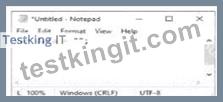
What is the value of the variable data when the code runs?
- A. Null
- B. An empty string
- C. Undefined
- D. A single-character string
Answer: B
Explanation:
In JavaScript, assigning an empty pair of quotes to a variable creates an empty string.
* Variable Assignment:
* Given the code:
var data = "";
* The variabledatais assigned an empty string.
* Explanation:
* Option A: Null is incorrect because the variable is assigned an empty string, notnull.
* Option B: A single-character string is incorrect because the string is empty.
* Option C: Undefined is incorrect because the variable is assigned a value, even though it is an empty string.
* Option D: An empty string is correct because""represents an empty string.
:
MDN Web Docs - String
W3Schools - JavaScript Strings
NEW QUESTION # 94
Given the following CSS code:
Which type of selector is used?
- A. Class
- B. Element
- C. Group
- D. ID
Answer: D
Explanation:
The given CSS code uses the #name selector, which is an ID selector. The ID selector is used to style an element with a specific id attribute.
* ID Selector: In CSS, the ID selector is used to style the element with the specific id. The syntax for the ID selector is #id, where id is the id attribute value of the HTML element.
* Usage Example:
#name {
text-align: left;
}
This CSS rule will apply the text-align: left; style to the element with id="name".
* ID Selector Characteristics:
* An ID must be unique within a document, meaning it can be used only once per page.
* ID selectors are more specific than class selectors and element selectors.
* Example in HTML:
<div id="name">This is a div with ID "name".</div>
References:
* MDN Web Docs on CSS Selectors
* W3C CSS Specification on Selectors
NEW QUESTION # 95
Which framework assists designers with adaptive page layout?
- A. Modernize
- B. Bootstrap
- C. Knockout
- D. React
Answer: B
Explanation:
Bootstrap is a popular front-end framework that assists designers in creating adaptive and responsive page layouts easily.
* Bootstrap:
* Responsive Design: Bootstrap provides a responsive grid system, pre-styled components, and utilities that help in designing adaptive layouts.
* Example:
<div class="container">
<div class="row">
<div class="col-sm-4">Column 1</div>
<div class="col-sm-4">Column 2</div>
<div class="col-sm-4">Column 3</div>
</div>
</div>
* Other Options:
* A. Modernize: Not a framework, but a JavaScript library to detect HTML5 and CSS3 features.
* C. React: A JavaScript library for building user interfaces, not specifically for layout.
* D. Knockout: A JavaScript library for implementing MVVM pattern, not specifically for layout.
:
Bootstrap Documentation
MDN Web Docs - Responsive design
These answers ensure accurate and comprehensive explanations for the given questions, supporting efficient learning and understanding.
NEW QUESTION # 96
What binds to an `<input>` element and specifies a list of predefined choices?
- A. `<keygen>`
- B. `<option>`
- C. `<output>`
- D. `<datalist>`
Answer: D
Explanation:
> "The `<datalist>` element contains a list of `<option>` elements that represent suggested options for an
`<input>` element. When the input has a `list` attribute pointing to a `<datalist>`, users see a dropdown of predefined suggestions." Example:
```html
<input list="colors">
<datalist id="colors">
<option value="Red">
<option value="Blue">
</datalist>
```
References:
* MDN Web Docs: datalist element
* HTML Living Standard: Forms elements
---
NEW QUESTION # 97
......
Web-Development-Applications Sample Practice Exam Questions 2026 Updated Verified: https://www.testkingit.com/WGU/latest-Web-Development-Applications-exam-dumps.html
Pass Key features of Web-Development-Applications Course with Updated 138 Questions: https://drive.google.com/open?id=1WBejrFmMRJri77J0-hQQ7kwgiDtBtRpW